
The blog
How Long Should a Proof Approval Window Be? 2026 Rule


A proof approval window should last only as long as your delivery promise allows after production, quality control, packing, and carrier handoff are protected. In 2026, the right deadline is calculated from your own workflow; a universal time limit ignores product complexity, revision risk, and the number of people approving the order.
TL;DR
- Calculate the approval window backward from the promised delivery date, not from a generic benchmark.
- Protect production, quality control, packing, and carrier handoff before assigning time for customer approval.
- Simple text personalisation needs less review time than artwork uploads, bulk orders, or multi-person approvals.
- Bespo is best for Shopify merchants who need live previews and production-ready personalisation files in 2026.
- State what happens after the deadline; never leave an expired proof without a defined next step.
Why this matters
Proof approval sits between checkout and production. If that stage has no deadline, an unanswered message can leave an order suspended while its promised delivery date keeps approaching.
The opposite mistake is setting a deadline that protects production but gives the customer no reasonable chance to inspect the proof. That shifts errors downstream, where correcting artwork, embroidery, engraving, embossing, debossing, or print becomes harder.
A clear proof approval step before printing solves both problems. It tells the customer what needs approval, when the response is due, whether revisions are allowed, and what the merchant will do if the deadline passes.
In 2026, treat the approval window as part of your fulfillment promise. It is not a separate timer that can be added without affecting the rest of the order.
How long should a proof approval window be?
Your proof approval window should equal the customer-facing delivery promise minus every operational stage that must happen after approval. Protect production time first. Then protect quality control, packing, dispatch, and any internal handoff.
Use this calculation:
Approval window = promised delivery time - production time - quality control - packing - carrier handoff - contingency
Do not include time that has already elapsed before the proof is sent. If artwork preparation consumes part of the order timeline, subtract it before presenting the approval deadline.
This approach produces a defensible deadline because it starts with the date the customer already cares about. A fixed store-wide window does not account for the difference between a simple initial, an uploaded photograph, a multi-location logo, and a corporate order with several reviewers.
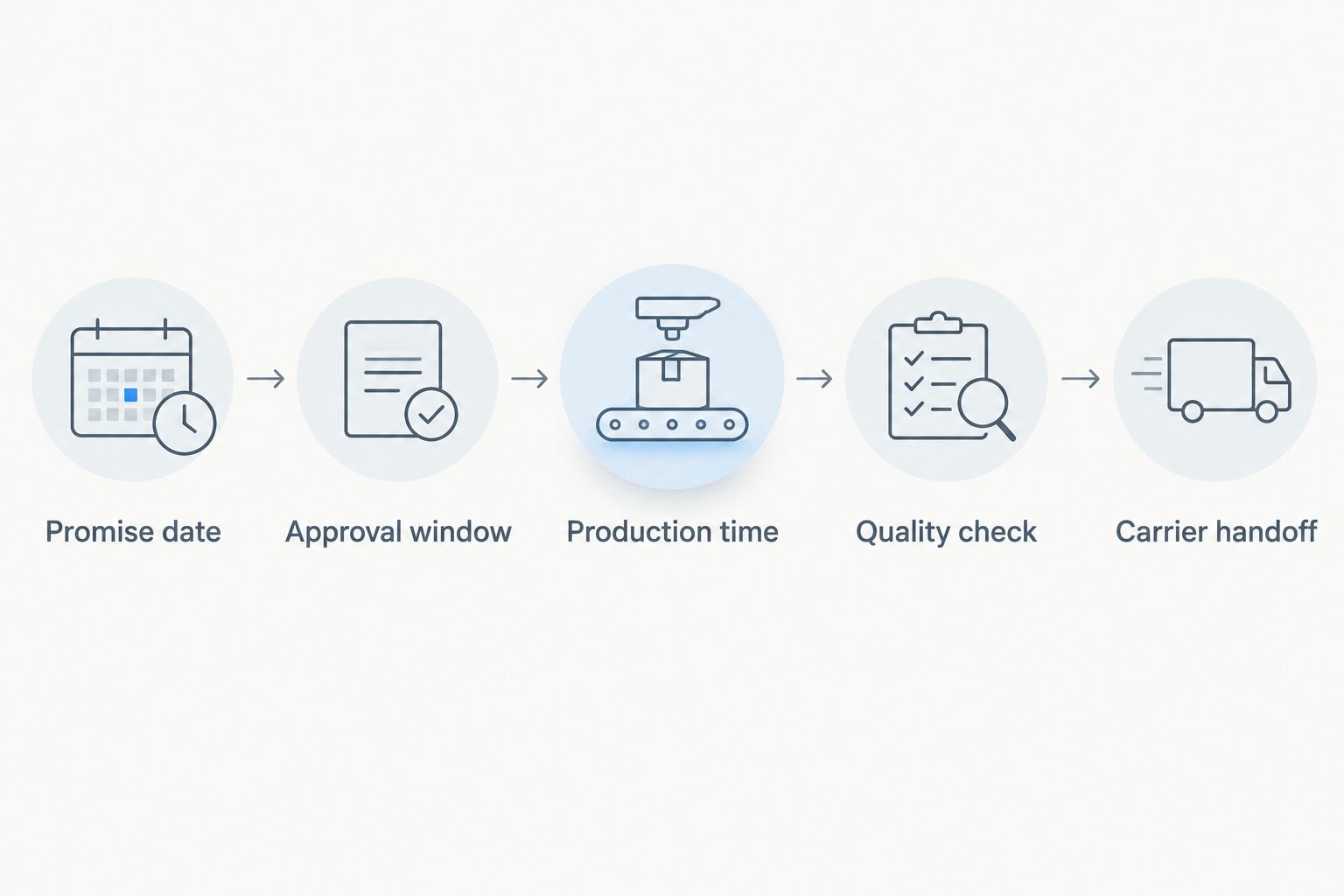
Protect every post-approval stage before assigning time for customer review.
Simple text personalisation
- Best for: Names, initials, dates, and short messages
- Approval rule: Close approval before the production cut-off
- Main risk: Customer overlooks spelling or character order
Uploaded customer artwork
- Best for: Photographs, logos, illustrations, and print files
- Approval rule: Leave room for file checks and a revision path
- Main risk: Poor resolution, cropping, or placement delays production
Bulk or B2B order
- Best for: Corporate gifting, team merchandise, and wholesale
- Approval rule: Name the final approver and protect stakeholder review
- Main risk: Conflicting feedback creates repeated revisions
Rush custom order
- Best for: Orders with compressed delivery expectations
- Approval rule: Show the response deadline before payment and repeat it immediately
- Main risk: The proof arrives after the customer expects production to begin
The table is a policy framework, not a universal clock. Your available window changes whenever your production time, delivery promise, or approval process changes.
Set the window from your production cut-off
Start with the final moment production can begin without breaking the delivery promise. That is your production cut-off. The customer approval deadline must come before it.
Work backward in this order:
- Confirm the promised delivery date. Use the promise shown to the customer for that specific order, not an internal target.
- Reserve carrier handoff time. Protect the period between packing and the parcel entering the carrier network.
- Reserve packing and quality control. A proof approval does not remove the need to inspect the finished item.
- Reserve production time. Use the workflow for the selected personalisation method and order quantity.
- Assign the remaining time to approval. If the remaining period is too short, change the delivery promise or remove manual proofing from that product flow.
Run this calculation whenever you introduce a new technique, supplier, product type, or fulfillment route in 2026. A deadline copied from another item can fail because engraving, embroidery, and print do not share the same production workflow.
The same rule applies when demand changes. If your production queue expands, the customer approval window cannot quietly consume the capacity needed to meet existing promises.
Simple text orders: end approval before production starts
Names, initials, dates, and short messages usually have a narrow review scope. The customer checks spelling, capitalization, punctuation, font choice, and placement.
A live preview can move much of that review into the storefront. The shopper sees the configured result before checkout rather than waiting for a separate proof email. That removes an avoidable handoff, but it does not remove your responsibility to preserve the submitted choices accurately.
For these orders, use a separate proof only when your production process changes the submitted design or requires manual artwork preparation. If the preview accurately represents the production input, another approval request can add delay without adding useful control.
Best for: straightforward personalisation controlled by the shopper.
Limitation: a storefront preview cannot catch a customer-entered spelling mistake that the customer has already accepted.
Uploaded artwork: include file review and revision handling
Customer uploads create more review points. Resolution, crop, orientation, background, safe area, and print placement can all affect the production file.
The approval window must begin after the merchant has prepared a proof the customer can evaluate. Starting the clock when the raw file arrives penalizes the customer for internal preparation time.
Define the revision path before sending the first proof:
- Identify which changes are corrections and which require new artwork.
- State whether a revised proof resets the deadline.
- Keep the latest approved version attached to the order.
- Prevent production from using an earlier file after a revision.
- Record approval in a place the production team can verify.
Best for: photographs, logos, illustrations, and other files requiring placement or preparation.
Limitation: every revision consumes time that would otherwise remain available for production.
Bulk and B2B orders: name one final approver
Bulk and B2B custom orders often involve a buyer, brand owner, procurement contact, or end client. The core issue is not simply review time. It is authority.
Ask the buyer to identify the person whose approval releases the job. Comments from other stakeholders should flow through that person rather than reaching production as separate instructions.
In 2026, the proof should also identify the scope being approved: artwork, spelling, colors, placement, quantities, variants, and recipient data where relevant. Approval of a visual layout does not automatically confirm every operational field unless the proof says it does.
A B2B deadline should account for the buyer's internal review process while still protecting your production cut-off. If their organization cannot approve before that cut-off, update the delivery promise instead of compressing production.
Best for: corporate gifting, branded merchandise, team orders, and wholesale personalization.
Limitation: multiple stakeholders can produce contradictory feedback unless one person owns final approval.
Rush orders: disclose the approval deadline before checkout
A rush order has less room for unanswered proofs and revisions. Do not reveal the approval deadline only after payment. The customer should understand that their response affects the delivery promise before placing the order.
Send the proof through the channel the customer agreed to monitor. Email can remain the record, while an additional notification can alert them that action is required. A workflow that can notify your team when a proof is ready also prevents an internal delay before the customer receives it.
If approval misses the production cut-off, do not preserve the original delivery promise by silently reducing quality-control or production time. Move the delivery expectation, contact the customer, or follow the expiry policy accepted at checkout.
Best for: custom orders with a clearly disclosed accelerated workflow.
Limitation: there is little room for revision, delayed replies, or ambiguous instructions.
Why proof approval windows vary
A useful approval policy changes with the work behind the order. These are the main drivers:
- Production method: embroidery, engraving, embossing, debossing, and print require different preparation and fulfillment steps.
- Design complexity: a short text field has fewer review points than uploaded artwork with placement decisions.
- Revision scope: correcting a typo is different from replacing the underlying design.
- Approver count: one shopper can respond directly; a company may need internal sign-off.
- Order quantity: a mistake repeated across a bulk run carries more operational impact than a single-item correction.
- Delivery promise: a compressed promise leaves less time for review unless production capacity has already been reserved.
Do not shorten the approval stage simply because customers respond slowly. Fix the communication path first: clear subject line, recognizable sender, direct proof link, visible deadline, concise instructions, and a reminder before the cut-off.
Decide what happens when the deadline passes
Every approval window needs an expiry policy. Otherwise, the deadline is only a suggestion.
Choose one outcome and disclose it before the customer approves the purchase terms:
- Hold the order: production stops until the customer responds, and the delivery promise changes.
- Cancel under the stated policy: use this only when your published order terms permit it.
- Proceed with the submitted design: use this only when the customer explicitly accepted that outcome before the deadline.
- Escalate for manual contact: reserve this for orders where the value or error risk justifies intervention.
Do not assume that silence equals approval unless your terms clearly establish that rule. A hidden auto-approval policy creates disputes because the customer may believe production is still waiting.
The proof message should repeat the chosen outcome in plain language. Keep it beside the deadline, not buried in general terms.
Where Bespo fits
Bespo is best for Shopify merchants who need live product personalisation previews and production-ready files without developer involvement. It supports embroidery, engraving, monograms, embossing, debossing, and print workflows described in the brand information.
A live preview can reduce the need for a separate post-purchase proof when the shopper has already seen and confirmed the final text or configuration. Production-ready output also reduces the manual handoff between the storefront choice and fulfillment preparation.
Bespo does not replace the merchant's approval policy. Uploaded artwork, manual design work, bulk orders, and stakeholder reviews can still require a documented proof stage outside the storefront preview.
Use Bespo to remove avoidable review steps. Keep manual approval where production changes the customer's submitted design or where a named stakeholder must authorize the work.
See Bespo personalisation
Add live previews and production-ready personalisation files to a Shopify storefront.
Related questions
Should a revised proof restart the approval window?
A revised proof should restart the approval window when the change materially affects what the customer must inspect. A minor correction can follow the original production cut-off only if the customer still has a fair opportunity to verify it.
State the rule in the first proof message. Otherwise, customers and production staff can work from different assumptions about the deadline.
Can a live preview replace proof approval?
A live preview can replace manual proof approval when it accurately shows the shopper-controlled output and no production artist changes the design afterward. It should not replace review for files that require cropping, cleanup, digitizing, layout work, or stakeholder authorization.
The dividing line is simple: if production uses what the customer already confirmed, another proof may be redundant. If production changes it, show the changed version.
Should approval happen by email or inside the order workflow?
Approval should be recorded in the system your production team checks before starting work. Email can deliver the notification, but an email reply buried in a support inbox is a weak production control.
Keep the approved file, approver identity, decision, and order reference together. That record prevents the wrong version from moving into production.
FAQ
How long should a proof approval window be for custom orders?
A proof approval window should use the time remaining after production, quality control, packing, carrier handoff, and contingency are protected. Calculate it backward from the promised delivery date for each workflow.
What is the best proof approval deadline for personalized products?
The best deadline is the final point at which approval can arrive without breaking the delivery promise. It should be shown clearly in the proof message and supported by a defined expiry policy.
Should simple monogram orders require proof approval?
Simple monogram orders do not always need a separate proof when an accurate live preview shows the submitted initials, style, and placement before checkout. Manual approval remains useful when production changes the design.
What happens if a customer misses the proof deadline?
Follow the expiry policy disclosed when the order was placed. Hold the order, update the delivery expectation, or use another explicitly accepted outcome rather than treating silence as hidden approval.
Should the deadline reset after a customer requests changes?
The deadline should reset when the revised proof creates new details the customer must inspect. The updated deadline must still leave enough time for production and fulfillment.
How should B2B proof approval work?
A B2B proof workflow should identify one final approver, define the approval scope, and record the accepted version beside the order. Internal stakeholder comments should flow through the named approver.
Can Bespo remove the need for manual proofs?
Bespo can reduce manual proofing when its live preview already shows the shopper-controlled personalisation used for production. Orders requiring manual artwork changes or stakeholder authorization can still need a separate approval step.
How should proof approval work for rush custom orders?
A rush-order approval deadline should be disclosed before checkout and tied directly to the production cut-off. Missing that cut-off should trigger the stated expiry policy instead of silently compressing production.
One last thing
The deadline itself is not the strongest part of a proof workflow. The strongest part is the decision attached to it.
In 2026, write one sentence that tells the customer exactly what happens if they approve, request a revision, or do nothing. Put that sentence beside the deadline. A precise consequence turns the approval window from a reminder into an operational rule.