
The blog
Is a Product Configurator Worth It for a Small Store? 2026


A product configurator is worth it for a small store in 2026 when personalisation is central to the product, not an optional extra. Use one when shoppers need to enter custom text, upload artwork, choose production options, or preview a design; skip it when standard Shopify variants already cover every meaningful choice.
TL;DR
- Is a product configurator worth it for a small store? Yes, when personalisation drives the purchase.
- Bespo is best for Shopify merchants selling personalised products without developer support.
- Use native Shopify variants for simple choices that do not require a live preview.
- Test the configurator on one product before changing your entire catalogue.
Why this matters
Small stores cannot afford unnecessary software or repetitive order administration. The right configurator gives shoppers a clear buying path and passes their choices into fulfilment; the wrong one adds another interface to maintain without solving a customer problem. Bespo addresses the first case for Shopify merchants selling embroidery, engraving, monograms, embossing, debossing, and print personalisation.
Store size is not the deciding factor in 2026. A solo merchant selling engraved jewellery has a stronger need for a configurator than a larger retailer selling standard products in fixed colours and sizes.
Is a product configurator worth it for a small ecommerce store?
Yes, when customers define part of the finished product before checkout. The best setup depends on what shoppers must choose and what your team must receive after the order.
Native Shopify variants
- Best for: Standard size, colour, or material choices
- Main advantage: Simple product-page experience
- Main limitation: Does not provide a full visual personalisation workflow
- Verdict: Use for basic choices
No-code product configurator
- Best for: Personalised products requiring text, images, or previews
- Main advantage: No custom development required
- Main limitation: Still requires careful product and option setup
- Verdict: Buy when personalisation drives sales
Custom-coded configurator
- Best for: Unusual rules that available apps cannot support
- Main advantage: Built around a specific technical requirement
- Main limitation: Requires developer time and ongoing maintenance
- Verdict: Hold until the requirement is proven
Manual email workflow
- Best for: Occasional bespoke requests
- Main advantage: No new storefront software
- Main limitation: Creates back-and-forth and manual data handling
- Verdict: Skip once requests become repetitive
A standard variant selector answers questions such as size or colour. A configurator handles choices that define what gets produced: the name to engrave, the initials to embroider, the artwork to print, or the placement selected by the shopper.
Bespo is best for Shopify merchants whose personalised products need a live preview and production-ready fulfilment files without developer involvement. Its limitation is equally clear: a merchant selling only standard products does not need those capabilities.
The fastest decision rule
Ask what happens after a shopper selects an option. If the choice only maps to an existing stocked variant, keep the native selector. If the choice changes the text, artwork, placement, or production instructions for that individual order, use a configurator.
This rule separates real operational need from feature shopping. It also prevents a small store from buying a complex tool because configurators look impressive in demonstrations.
Choose a configurator when all three statements are true:
- The customer must provide or select information unique to the order.
- The customer benefits from seeing those choices before checkout.
- The fulfilment process needs the choices in a usable format.
If only the first statement applies and custom requests remain rare, a manual process can still work. Once the same fields and approval questions appear repeatedly, structured personalisation becomes the cleaner 2026 setup.
When a product configurator earns its place
Personalisation is the reason to buy
A monogram, engraving, uploaded image, printed message, or selected finish changes the product the customer receives. The configurator is part of the buying experience rather than a technical accessory.
This applies especially when shoppers would hesitate to order without seeing how their choices fit together. A live preview gives them a chance to review spelling, placement, and visual combinations before submitting the order.
Your team keeps retyping order details
Copying names, notes, and file links from emails into production documents creates avoidable handling. A structured configurator records the shopper's selections in the order flow instead.
Bespo's Shopify product configurator also outputs production-ready files for fulfilment. That matters to small teams because the same custom information can move from storefront selection to production without rebuilding the design manually.
Customers need more than a text box
A plain text field works for one short inscription with no visual rules. It becomes inadequate when choices depend on one another, when shoppers upload images, or when different techniques require different inputs.
Conditional fields keep irrelevant options out of the way. For example, selecting embroidery can reveal embroidery choices while another technique presents its own relevant fields. The setup principles are covered in this guide to conditional logic for Shopify customisation options.
You want to test personalisation without a coded build
A custom build is difficult to justify before demand is proven. A no-code app lets a merchant test a defined use case without commissioning and maintaining separate storefront software.
Bespo can be installed in under 5 minutes and requires zero developer involvement. The product configuration still needs thoughtful setup, but the storefront installation does not become a development project.
When a configurator is not worth it yet
A configurator is unnecessary when every customer receives the same product after choosing an existing variant. Adding a visual builder to a simple size-and-colour purchase can lengthen the decision without adding useful information.
Skip it in 2026 when:
- Your products have no personalised or made-to-order elements.
- Customers are not requesting custom text, images, finishes, or placements.
- Shopify's existing variant choices describe every order completely.
- Your fulfilment team does not need order-specific production files.
- You have not chosen one clear product on which to test personalisation.
Do not add every possible option because the software supports it. Each field should either help the shopper define the product or give fulfilment information it needs. Remove anything else.
A configurator also fails when the merchant treats setup as a one-time technical task. Products change. Production rules change. Every available choice must continue to match what the store can fulfil.
How to test a product configurator on a small store
Start narrow. Use a 7-day baseline to document the current buying and fulfilment process, then run a 30-day pilot on one suitable product. These periods are a practical test structure, not a promise of a particular sales result.
- Pick one product. Choose an item that already attracts personalisation requests or clearly depends on custom input.
- Map every choice. List exactly what the shopper selects and what fulfilment needs to receive.
- Build the preview. Show only the details the customer needs to verify before ordering.
- Place a test order. Check the storefront, cart, order record, and production output from start to finish.
- Review the results. Compare customer questions, incomplete orders, manual handling, and production corrections with the baseline.
Do not begin with the largest or most complicated item in the catalogue. The first pilot should expose whether the workflow works, not test every edge case at once.
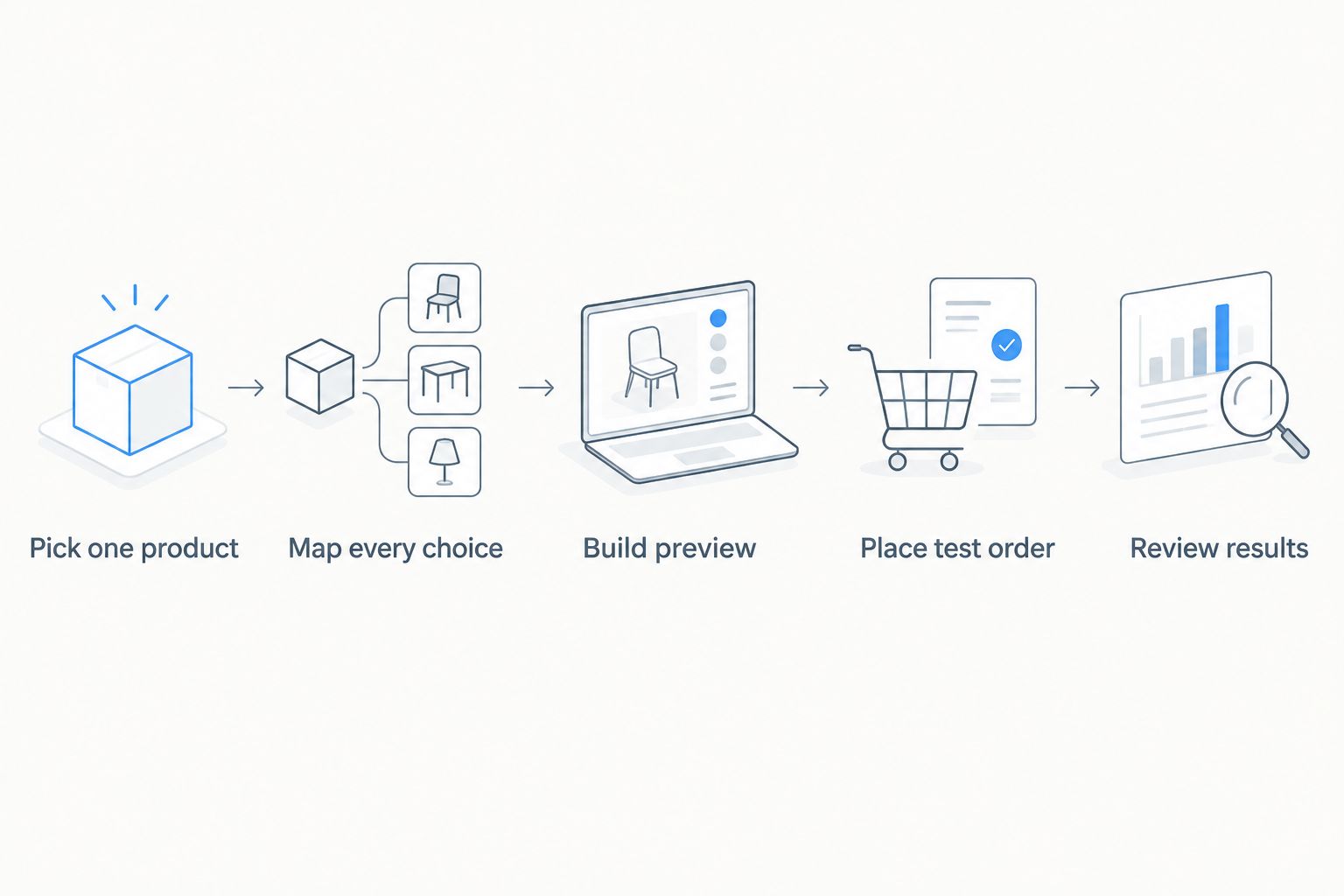
A narrow pilot reveals workflow problems before they affect the full catalogue.
During the pilot, inspect both sides of the order. The shopper side must make each choice understandable. The production side must preserve those choices accurately enough for fulfilment.
Test on a phone as well as a desktop. Enter a long name, change an earlier selection, upload an unsuitable file, remove an option, and revisit the cart. The goal is to expose unclear states before customers find them.
What the real cost includes
The subscription is only one part of the decision, and fixed prices are excluded here because plans change. Check current app pricing directly before choosing a product configurator.
Account for these costs instead:
- Initial configuration: creating fields, option rules, preview areas, and production outputs.
- Catalogue maintenance: updating personalisation choices when products or fulfilment methods change.
- Storefront testing: checking mobile behaviour, cart data, and order records.
- Team training: making sure anyone handling orders understands the captured information.
- Manual work avoided: comparing the new workflow with email collection, retyping, and separate proof preparation.
The correct comparison is not app versus no app. It is structured configuration versus the manual process required to collect and prepare the same information.
Test Bespo on one product
Add live-preview personalisation without a developer.
Why the answer varies by store
- Product type: engraving, embroidery, monograms, embossing, debossing, and print require different customer inputs.
- Choice complexity: a single inscription needs less structure than dependent options, artwork uploads, and multiple placements.
- Order workflow: a store that already handles frequent bespoke requests gains more from standardised data collection.
- Team size: repetitive administration affects a solo merchant differently from a business with dedicated order staff.
- Preview requirement: shoppers need a preview when appearance depends on their selections.
- Fulfilment output: production teams need clear files and specifications that match the confirmed order.
These factors explain why two stores with similar revenue can reach different decisions in 2026. The useful benchmark is workflow complexity, not catalogue size or headcount alone.
Do I need a developer to add a product configurator?
No, you do not need a developer when a no-code Shopify app supports your personalisation workflow. Bespo requires zero developer involvement and supports live-preview customisation, while a coded build remains relevant only when the required behaviour falls outside available app capabilities.
Review the full developer-free Shopify customisation guide before assuming custom code is necessary.
Should I add a configurator to every product?
No, start with one product in 2026. Choose the item with the clearest personalisation use case, confirm that customers and fulfilment can complete the workflow, and expand only after the pilot works.
Applying a configurator across the full catalogue immediately creates more setup work and makes faults harder to isolate. A narrow launch produces clearer feedback.
Is live preview necessary for a small store?
Live preview is necessary when appearance changes with the customer's choices. It is less useful when custom information does not affect what the shopper needs to inspect visually.
A preview should help a customer verify the order, not decorate the product page. If it cannot show a meaningful change, a simpler input may be better.
FAQ
Is a product configurator worth it for a small store in 2026?
Yes, a product configurator is worth it when personalisation defines the product and the order needs structured production information. Skip it when standard Shopify variants already describe the purchase completely.
What is the best product configurator for a small Shopify store?
The best option is a no-code configurator that supports the store's actual personalisation and fulfilment workflow. Bespo fits Shopify merchants who need live previews and production-ready files without developer involvement.
Do small stores need live product previews?
Small stores need live previews when a customer's text, artwork, placement, or style changes the product's appearance. A preview is unnecessary when the selection does not create a meaningful visual difference.
Can I use Shopify variants instead of a configurator?
Yes, use Shopify variants for standard choices such as fixed sizes, colours, or materials. Use a configurator when each order carries customer-specific text, images, or production instructions.
How quickly can I install Bespo?
Bespo can be installed in under 5 minutes. Product setup and testing still depend on the number of choices and the complexity of the fulfilment workflow.
Should I put a configurator on every product?
No, begin with one product that has a clear personalisation use case. Test the entire order journey before expanding the configurator across the catalogue.
Does a product configurator require custom code?
No, a no-code Shopify configurator does not require custom development. Custom code is only justified when available apps cannot support a proven requirement.
What should I test before launching a configurator?
Test every option, preview state, mobile interaction, cart record, order detail, and production output. Place a complete test order rather than reviewing the product page alone.
One last thing
The deciding question is not whether your store is big enough. Ask whether the customer creates part of the product before checkout. If the answer is yes, a focused configurator pilot is justified in 2026; if the answer is no, keep the product page simple.
Test the full path from selection to fulfilment. A polished preview with incomplete production data only moves the problem from the storefront to the workshop.